In the realm of computer upgrades, RAM is a crucial component that can significantly enhance a system’s performance. DDR4 RAM, the fourth generation of Double Data Rate memory, is widely regarded for its speed benefits and power efficiency over its predecessors. Upgrading to DDR4 RAM can expedite tasks, reduce system bottlenecks, and provide smoother operation for multitasking, gaming, and professional applications.
When considering DDR4 RAM for a system upgrade, several factors warrant attention. The RAM’s capacity is pivotal, as it directly influences how many applications can run simultaneously without slowdowns. Speed, measured in MHz (megahertz), determines how quickly data can be accessed and transferred, impacting overall latency and performance. Compatibility with the system’s motherboard and CPU is also essential to ensure that the RAM can be utilized to its fullest potential. Moreover, brands and models can differ in terms of reliability and warranty, which are critical for long-term use.
To identify the best DDR4 RAM options available, substantial research and testing were conducted, focusing on real-world applications and user needs.
Best DDR4 RAM
Presented here is a curated selection of the best DDR4 RAM options. Each product features excellent performance and reliable speed to enhance your computing experience.
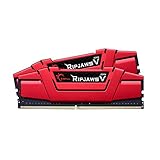
- G.SKILL RipjawsV Series DDR4 U-DIMM Memory Kit, Model: F4-2666C15D-32GVR
- 32GB total capacity kit containing 2x16GB modules, rated for up to DDR4-2666 CL15-15-15-35 at 1.20V
- Non-ECC, DDR4 U-DIMM, 288-pin, for Desktop PC & Gaming
G.SKILL Ripjaws V Series

A solid choice for those looking to enhance their PC’s performance with a dependable memory upgrade.
Pros
- High performance for gaming and multitasking
- Easy installation with XMP profile support
- Sleek, attractive design
Cons
- May require manual configuration for full speed
- Not the fastest RAM available
- Limited to specific system configurations
The G.SKILL Ripjaws V Series is a popular option among PC enthusiasts who value efficiency and reliability. It offers a 32GB kit that integrates seamlessly into desktop builds. The dual-channel configuration significantly boosts system capability, making it ideal for multitasking and gaming.
Easy installation is one of its standout features. Users find it relatively straightforward to set up, especially with the included XMP profiles, which allow effortless optimization of the memory performance. The striking red heatsinks add a touch of style, making it not only a functional component but also a visual upgrade.
Despite its benefits, there are a few considerations. Compatibility can be limited, and it might not tap into maximum speeds without proper motherboard and CPU support. Still, for an upgrade that enhances daily performance tasks, the Ripjaws V Series is a worthy contender. For a more detailed examination of its features, check out a review of the G.SKILL Ripjaws V, which underscores its potential as a reliable upgrade.

- Customizable RGB Lighting
- RGB effects stay sync with Kington's patented infrared technology
- Intel XMP Certified profiles optimized for Intel’s latest chipsets
Kingston FURY Renegade RGB DDR4

Anyone looking for a balance of speed, style, and performance in their gaming rig should consider this RAM.
Pros
- Vibrant RGB lighting enhances visual appeal
- Offers impressive speed for high-performance tasks
- Compatible with both AMD and Intel platforms
Cons
- May be overkill for non-gaming usage
- RGB setup might require additional software
- Price may be a barrier for budget builds
Kingston FURY Renegade RGB DDR4 stands out with its eye-catching RGB lights. The RGB effects are synchronized seamlessly, thanks to Kingston’s advanced technology. This not only boosts the performance in gaming but also adds a touch of flair to your setup.
The memory speed is another highlight, reaching up to impressive frequencies that ensure smooth multitasking and gaming experiences. It works efficiently with both AMD and Intel systems, giving users flexibility regardless of their setup.
Potential buyers should take note that while the performance is top-notch, the price might make some hesitate if they’re not utilizing it for high-end gaming or video tasks. There’s also the consideration of managing the RGB settings, which can be both a pro and a con depending on a user’s preference. For a more detailed view, you may want to explore further details in a review.
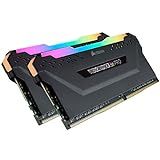
- High performance DDR4 memory illuminates your system with vivid, animated lighting from ten ultra-bright, individually addressable RGB LEDs per module.
- Take control with CORSAIR iCUE software and synchronize lighting across all your CORSAIR iCUE compatible products, including memory, fans, coolers, keyboards and more.
- Customize lighting profiles with millions of different patterns and colors, or create your own in CORSAIR iCUE software.
Corsair Vengeance RGB PRO

This RAM is an excellent choice for gamers looking to enhance both performance and aesthetics.
Pros
- Impressive RGB lighting enhances visual appeal
- Easy installation without extra wiring
- Excellent overclocking potential
Cons
- Requires iCUE software for RGB customization
- Can be pricey compared to non-RGB options
- RGB may not be for everyone
The Corsair Vengeance RGB PRO DDR4 RAM is perfect for those wanting to add some flair to their setups. This memory kit offers excellent performance, complemented by striking RGB lighting. Each module includes ten individually addressable LEDs, creating a stunning light show that will surely catch the eye.
Installation is straightforward thanks to its wire-free design. This simplicity saves time and reduces clutter inside the case. Additionally, the RAM’s overclocking capabilities stand out, allowing users to push computing power to new heights. This feature, coupled with its heat spreader, ensures top-notch performance and cooling.
While the RGB lighting is a significant selling point, it relies on the iCUE software for customization. Those not interested in lighting effects might find lights unnecessary. Nonetheless, for users seeking to boost both looks and function, this RAM does not disappoint.
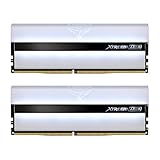
- A white and flawless morning star. Full mirror light penetration. Latest ARGB (Addressable RGB) technology. Support multiple lighting control software. Supports software synchronization.
- High speed low latency performance. Superior performance and capacity upgrade. Selected high quality IC that is stable and reliable. Support O.C. Profile for one click overclocking.
- Aluminum alloy heat sink with high performance. Premium overclocking 10-layer board.
TEAMGROUP T-Force XTREEM ARGB RAM

Exceptional design paired with high performance makes this RAM a solid option for desktop gamers and builders seeking an aesthetic upgrade.
Pros
- Stunning RGB lighting enhances visual appeal.
- Impressive speed and stability boost system performance.
- Easy overclocking for users with compatible setups.
Cons
- Requires motherboard compatibility checks beforehand.
- RGB setup depends on software compatibility.
- Potential issues with getting advertised speeds without BIOS tweaks.
The TEAMGROUP T-Force XTREEM ARGB RAM brings a visually captivating touch to any desktop with its modern RGB lighting. Users love how the ARGB enhances the look of an all-white build. When installed, the light effects display beautifully, meeting expectations of buyers focused on aesthetics.
Performance-wise, this RAM delivers speed and stability, vital for gaming or demanding applications. Despite its strengths, buyers should ensure their motherboard supports this memory. Compatibility checks are recommended to avoid installation issues.
Overclocking enthusiasts will find the RAM’s overclocking profile straightforward, usually enhancing system capabilities effectively. Yet, understanding BIOS settings is crucial. Many users have noted speed limitations without adjusting these settings. For those comfortable with tech adjustments and who relish the visual boost, this RAM does not disappoint. They should also check out the XTREEM ARGB 3600MHz review for additional insights.

- Iconic and refined DOMINATOR PLATINUM design perfectly complements the world’s best PCs, for unmistakable high-end system builds.
- Hand-sorted, tightly-screened memory chips ensure high frequency performance and tight response times, with overclocking headroom to spare.
- DOMINATOR PLATINUM RGB’s construction combines precision die-casting and anodization to create premium memory that’s built to last.
Corsair Dominator Platinum RGB

The Corsair Dominator Platinum RGB is an excellent choice for those seeking high-performance memory with exceptional aesthetics and reliable performance.
Pros
- Exceptional design enhances any high-end setup
- Tightly-screened chips offer robust overclocking potential
- Built-in RGB LEDs provide striking, customizable lighting
Cons
- High price point may deter some buyers
- Requires appropriate software for full customization
- Potential compatibility issues with some systems
The Corsair Dominator Platinum RGB DDR4 stands out with its impressive design, bringing a touch of elegance and sophistication to any PC build. The premium materials and craftsmanship are immediately noticeable, offering both durability and sleek aesthetics. For anyone who values appearance as much as performance, this RAM module is highly appealing.
Performance-wise, these RAM modules don’t disappoint. Overclockers will appreciate the tightly-screened memory chips that support high-frequency performance with stability. It’s satisfying to see how the memory maintains cool temperatures even under heavy load, thanks to the advanced cooling technology.
On the downside, the investment is considerable and not all systems may fully utilize its features due to compatibility considerations. Prospective buyers should ensure their motherboard supports it and consider the necessity of Corsair iCUE software to unlock the full potential of its RGB capabilities. For further detailed performance evaluations, check out this Dominator RGB review.
Buying Guide
When selecting DDR4 RAM, identifying the correct capacity is crucial. Users should determine the amount of RAM needed based on their typical computing tasks. For general use, 8GB might suffice, while gamers and creative professionals might need 16GB or more for optimal performance.
Consider the memory speed measured in megahertz (MHz). Higher speeds can offer better performance in tasks that require fast data processing. Common speed ranges include 2400MHz to 4000MHz. Users need to match the RAM speed with the motherboard’s capabilities for the best results.
Latency, represented as CL (CAS Latency), impacts performance as well. Lower latency usually means quicker data access times. A CL16 could be a good balance between speed and cost, but individual needs might vary.
Compatibility with the motherboard is another critical factor. Before purchasing, it’s important to check the motherboard’s specifications. This includes the form factor and the maximum supported RAM capacity, ensuring the RAM sticks fit and function properly.
Users should also evaluate heat management features when choosing RAM. Some RAM modules come with heatsinks or heat spreaders, aiding in temperature management during intensive tasks and ensuring consistent performance over time.
For those interested in aesthetics, design elements like RGB lighting can be appealing. While they don’t affect functionality, they can enhance the visual setup of a custom-built system.
Budget remains a fundamental part of the purchasing decision. Balancing the desired features with affordability ensures that users receive value without overspending.
Frequently Asked Questions
DDR4 RAM offers a wide range of options suitable for both gaming and everyday computing. Factors like speed, capacity, and compatibility with different CPUs and laptops are key components in maximizing performance.
What are the top DDR4 RAM options for high-performance gaming?
For high-performance gaming, some of the top DDR4 RAM brands include Corsair Vengeance, G.Skill Trident Z, and Kingston HyperX Predator. These options are known for their high speeds, reliable performance, and robust builds, making them excellent choices for gamers seeking an edge.
How does RAM speed affect the performance of gaming systems?
RAM speed can significantly impact gaming performance by reducing loading times and improving multitasking. Faster RAM enables quicker data transfer between components, which is crucial for seamless gameplay and enhanced overall performance. Memory speeds generally range from 2133 MHz to 4266 MHz, with higher speeds offering better performance in demanding games.
What are the advantages of 16GB DDR4 RAM for modern applications?
16GB of DDR4 RAM is often considered the sweet spot for modern applications. It provides ample capacity for running multiple applications simultaneously and supports smooth operation of memory-intensive tasks such as video editing, gaming, and graphic design. This balance makes it an excellent choice for most users seeking efficiency and performance.
What is the ideal amount of DDR4 RAM recommended for a Ryzen CPU?
When using a Ryzen CPU, 16GB to 32GB of DDR4 RAM is typically recommended. These processors benefit from dual-channel memory setups and faster RAM speeds, enhancing performance in multitasking and gaming environments. Choosing RAM with a minimum speed of 3200 MHz is advisable for optimal compatibility and efficiency with Ryzen CPUs.
Can you suggest high-speed DDR4 RAM suitable for laptops?
For laptops, Crucial Ballistix and Corsair Vengeance are top choices for high-speed DDR4 RAM. These options offer reliable performance and are designed for energy efficiency in portable devices. Upgrading to these RAM options can significantly improve a laptop’s speed and responsiveness in both casual use and more demanding applications.
Are there performance gains with 32GB of DDR4 RAM for everyday computing?
For everyday computing tasks, 32GB of DDR4 RAM may not provide noticeable gains over 16GB. However, for users who frequently run virtual machines or perform intensive video editing, the additional capacity can improve efficiency and reduce lag, enhancing the overall user experience.


